
Within the Peppol network, some recipients apply specific requirements that make additional invoice information mandatory. To meet these requirements, we provide the option to create extra fields. These extra fields can be completed on invoices and correctly sent via Peppol. This ensures that invoices are delivered in line with the expectations of specific parties.
Create an extra field
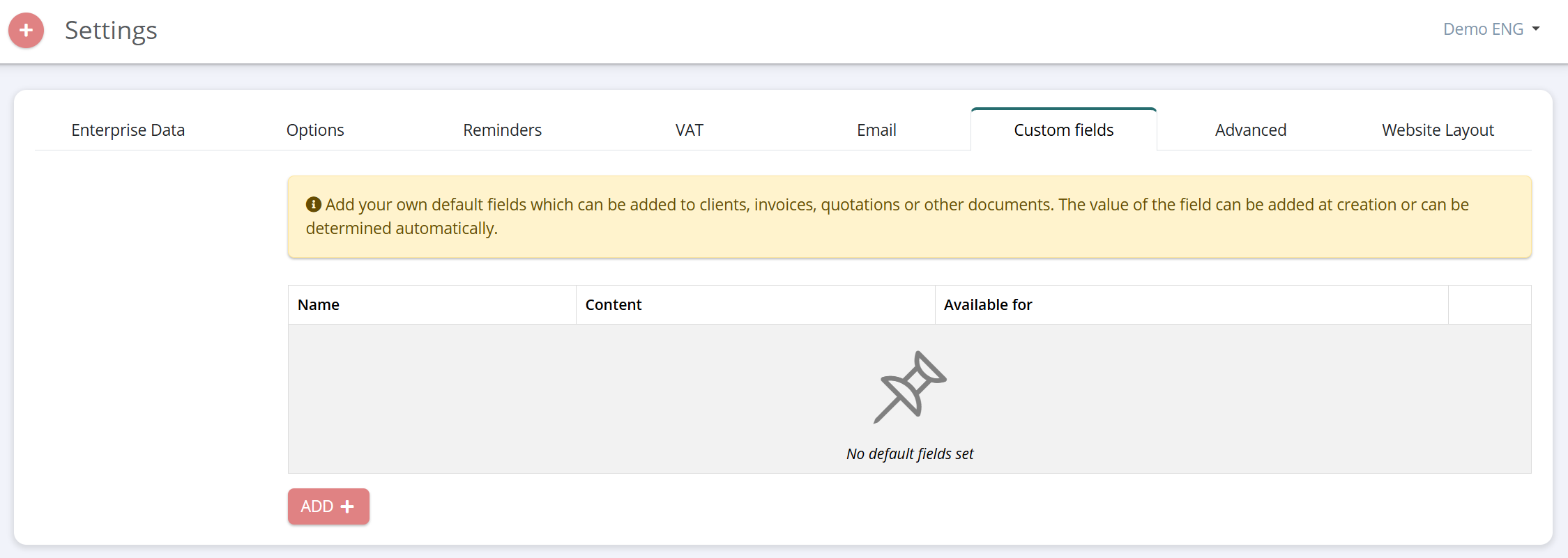
Go to 'Settings' > 'Extra fields' and add a field using the red 'Add' button.
Where and how to make it visible
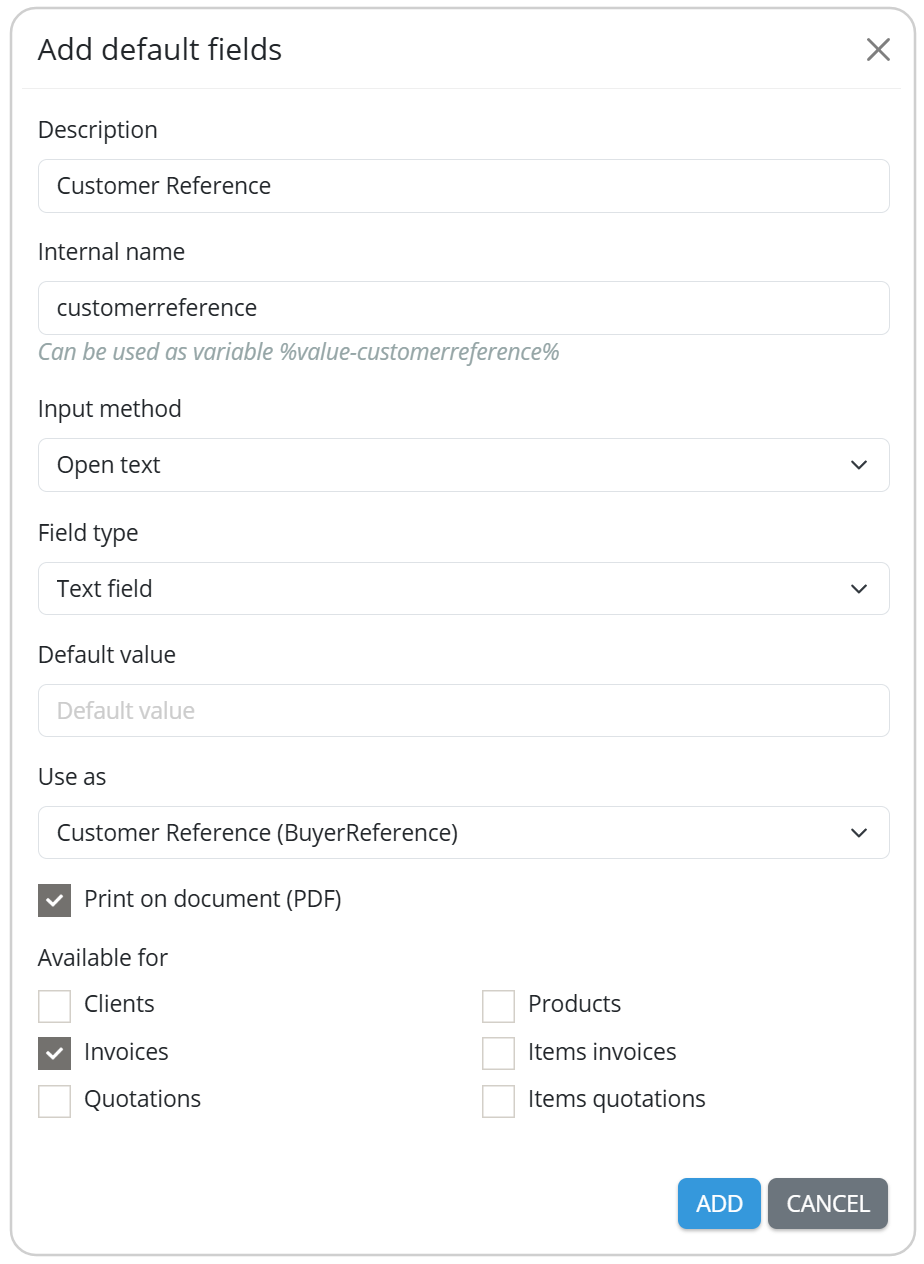
When creating an extra field, you can choose the level at which this field should be active. This can be, for example, at invoice, item line or customer level. Select the option "Print on document" if you want this information to appear on the invoice itself.
Please note: You can also make the field visible on the invoice afterwards. To do this, go to the layout editor > ‘Document details’ or 'Table' and tick the checkbox. This ensures that the extra field is displayed correctly on your documents.
Possible required fields
This overview shows which custom fields you can add to meet specific requirements from recipients within the Peppol network.
| BT | Extra field | UBL | Available for | Example |
| BT-13 | Purchase order number / PO number | OrderReference | Invoice | <cac:OrderReference> <cbc:ID>PO-2026-0001</cbc:ID> </cac:OrderReference> |
| BT-81 | Payment reference (Handled automatically through the structured communication) | PaymentMeans | Invoice | <cac:PaymentMeans> <cbc:PaymentMeansCode>1</cbc:PaymentMeansCode> <cbc:PaymentID>F2026-0001</cbc:PaymentID> </cac:PaymentMeans> |
| BT-16 | Despatch advice / DESADV | Despatch DocumentReference | Invoice | <cac:DespatchDocumentReference> <cbc:ID>DD-2026-0001</cbc:ID> <cac:DespatchDocumentReference> |
| BT-11 | Project code | ProjectReference | Invoice | <cac:ProjectReference> <cbc:ID>PROJ-2025-0001</cbc:ID> </cac:ProjectReference> |
| BT-12 | Contract reference | Contract DocumentReference | Invoice | <cac:ContractDocumentReference> <cbc:ID>CR-2026-0001</cbc:ID> </cac:ContractDocumentReference> |
| BT-10 | Customer reference | BuyerReference | Invoice | <cbc:BuyerReference>20302030</cbc:BuyerReference> |
| BT-72 | Delivery date | ActualDeliveryDate | Invoice | <cac:Delivery> <cbc:ActualDeliveryDate>2026-01-01</cbc:ActualDeliveryDate> </cac:Delivery> |
| BT-157 | Product code / GTIN | StandardItemIdentification | Invoice items Products | <cac:StandardItemIdentification> <cbc:ID schemeID="0160">12345678901112</cbc:ID> </cac:StandardItemIdentification> |
| BT-156 | Buyer product code | BuyersItemIdentification | Invoice items | <cac:BuyersItemIdentification> <cbc:ID>ART-CL-1234</cbc:ID> </cac:BuyersItemIdentification> |
| BT-70 | Shipping address GLN / Delivery address | DeliveryLocation | Customers Invoice | <cac:DeliveryLocation> <cbc:ID schemeID="0088">1234567891012</cbc:ID> </cac:DeliveryLocation> |
| BT-71 | Shipping address name | DeliveryLocation | Customers Invoice | <cac:DeliveryLocation> <cbc:Name>Example BV – Magazijn</cbc:Name> </cac:DeliveryLocation> |
| BT-130 | Item reference | DocumentReference | Invoice items | <cac:DocumentReference> <cbc:ID>ABC-2026-0001</cbc:ID> <cbc:DocumentTypeCode>130</cbc:DocumentTypeCode> </cac:DocumentReference> |
| BT-132 | Order line reference | OrderLineReference | Invoice items | <cac:OrderLineReference> <cbc:LineID>123456789</cbc:LineID> </cac:OrderLineReference> |
| BT-73 BT-74 | Invoice period (From + To) | StartDate + EndDate | Invoice | <cac:InvoicePeriod> <cbc:StartDate>2026-01-01</cbc:StartDate> <cbc:EndDate>2026-01-01</cbc:EndDate> </cac:InvoicePeriod> |
| BT-56 | Contact name | Name | Invoice | <cac:Contact> <cbc:Name>Thibault</cbc:Name> </cac:Contact> |
| BT-58 | Contact email | ElectronicMail | Invoice | <cac:Contact> <cbc:ElectronicMail>thibault@eenvoudigfactureren.com</cbc:ElectronicMail> </cac:Contact> |
| BT-59 | Factoring company | PartyName | Invoice | <cac:PartyName> <cbc:Name>EenvoudigFactureren</cbc:Name> </cac:PartyName> |
| BT-60 | Factoring company number | PartyIdentification | Invoice | <cac:PartyIdentification> <cbc:ID schemeID="0208">0462920000</cbc:ID> </cac:PartyIdentification> |
| BT-84 | Factoring IBAN | PayeeFinancialAccount | Invoice | <cac:PayeeFinancialAccount> <cbc:ID>BE68539007540000</cbc:ID> </cac:PayeeFinancialAccount> |
Deprecated extra fields
The extra fields below have been replaced by new functionality, allowing this information to be adjusted more easily and directly via the customer file can be adjusted.
More information on how to configure this can be found via the following link:
https://support.simplybooks.be/en/support/solutions/articles/101000508549-peppol-id
| Extra field | UBL | Example |
| Peppol ID | CustomerParty | <cac:CustomerParty> <cac:Party> <cbc:EndpointId schemeID="0208">1234567891012</cbc:EndpointId> <cac:Party> </cac:CustomerParty> |
| GLN | CustomerParty | <cac:CustomerParty> <cac:Party> <cbc:EndpointId schemeID="0088">1234567891012</cbc:EndpointId> <cac:Party> </cac:CustomerParty> |
| Dutch Chamber of Commerce number | CustomerParty | <cac:CustomerParty> <cac:Party> <cbc:EndpointId schemeID="0106">1234567891012</cbc:EndpointId> <cac:Party> </cac:CustomerParty> |
| Dutch OIN | CustomerParty | <cac:CustomerParty> <cac:Party> <cbc:EndpointId schemeID="0190">1234567891012</cbc:EndpointId> <cac:Party> </cac:CustomerParty> |
| Norwegian organisation number | CustomerParty | <cac:CustomerParty> <cac:Party> <cbc:EndpointId schemeID="0192">1234567891012</cbc:EndpointId> <cac:Party> </cac:CustomerParty> |