
Au sein du réseau Peppol, certains destinataires imposent des exigences spécifiques rendant certaines informations supplémentaires obligatoires sur la facture. Pour répondre à ces exigences, nous vous permettons de créer des champs supplémentaires. Ces champs peuvent être complétés sur les factures et transmis correctement via Peppol. Vos factures sont ainsi conformes aux exigences des destinataires concernés.
Créer un champ supplémentaire
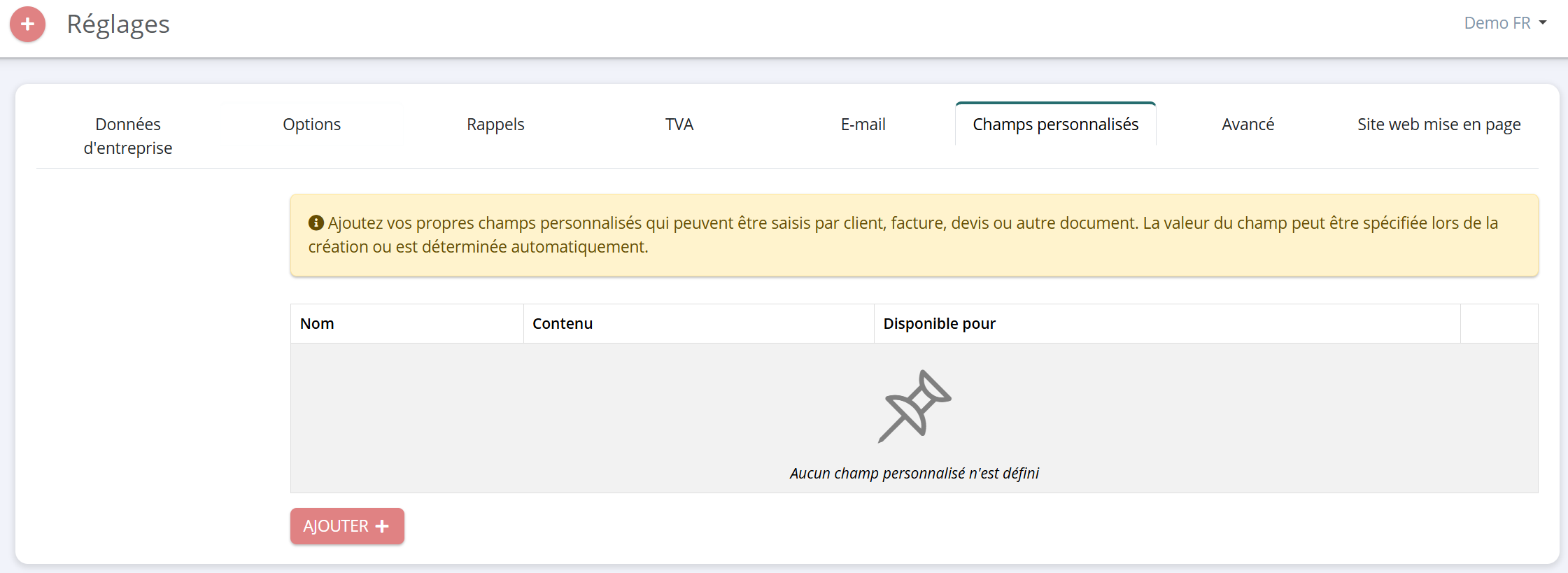
Accédez à 'Paramètres' > 'Champs supplémentaires' et ajoutez un champ à l’aide du bouton rouge 'Ajouter'.
Où et comment l’afficher
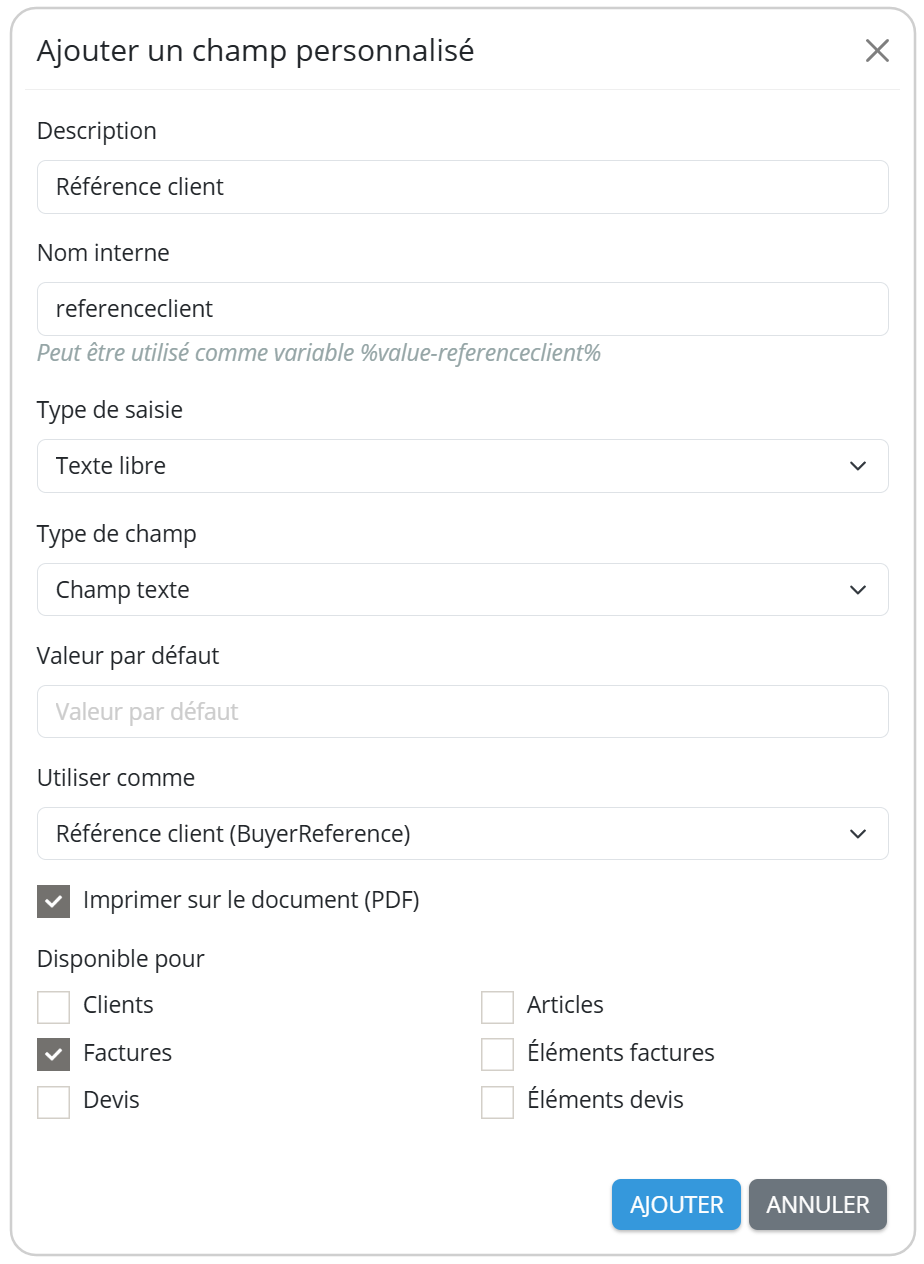
Lorsque vous créez un champ supplémentaire, vous pouvez choisir à quel niveau il sera disponible. Il peut par exemple être lié à la facture, à la ligne d’article ou au client. Sélectionnez l’option "Imprimer sur le document" si vous souhaitez afficher cette information sur la facture elle-même.
À titre d’information : Vous pourrez également rendre ce champ visible ultérieurement sur la facture. Pour cela, ouvrez l’éditeur de mise en page > ‘Données du document’ ou 'Tableau' et cochez la case correspondante. Le champ supplémentaire sera alors correctement affiché sur vos documents.
Champs éventuellement requis
Cet aperçu présente les champs supplémentaires que vous pouvez ajouter afin de répondre aux exigences spécifiques de certains destinataires du réseau Peppol.
| BT | Champ supplémentaire | UBL | Disponible pour | Exemple |
| BT-13 | Numéro de bon de commande / N° PO | OrderReference | Facture | <cac:OrderReference> <cbc:ID>PO-2026-0001</cbc:ID> </cac:OrderReference> |
| BT-81 | Référence de paiement (Générée automatiquement via la communication structurée) | PaymentMeans | Facture | <cac:PaymentMeans> <cbc:PaymentMeansCode>1</cbc:PaymentMeansCode> <cbc:PaymentID>F2026-0001</cbc:PaymentID> </cac:PaymentMeans> |
| BT-16 | Avis d’expédition / DESADV | Despatch DocumentReference | Facture | <cac:DespatchDocumentReference> <cbc:ID>DD-2026-0001</cbc:ID> <cac:DespatchDocumentReference> |
| BT-11 | Code projet | ProjectReference | Facture | <cac:ProjectReference> <cbc:ID>PROJ-2025-0001</cbc:ID> </cac:ProjectReference> |
| BT-12 | Référence du contrat | Contract DocumentReference | Facture | <cac:ContractDocumentReference> <cbc:ID>CR-2026-0001</cbc:ID> </cac:ContractDocumentReference> |
| BT-10 | Référence client | BuyerReference | Facture | <cbc:BuyerReference>20302030</cbc:BuyerReference> |
| BT-72 | Date de livraison | ActualDeliveryDate | Facture | <cac:Delivery> <cbc:ActualDeliveryDate>2026-01-01</cbc:ActualDeliveryDate> </cac:Delivery> |
| BT-157 | Code produit / GTIN | StandardItemIdentification | Lignes facturen Articles | <cac:StandardItemIdentification> <cbc:ID schemeID="0160">12345678901112</cbc:ID> </cac:StandardItemIdentification> |
| BT-156 | Code produit de l’acheteur | BuyersItemIdentification | Lignes facturen | <cac:BuyersItemIdentification> <cbc:ID>ART-CL-1234</cbc:ID> </cac:BuyersItemIdentification> |
| BT-70 | GLN de livraison / Adresse de livraison | DeliveryLocation | Clients Facture | <cac:DeliveryLocation> <cbc:ID schemeID="0088">1234567891012</cbc:ID> </cac:DeliveryLocation> |
| BT-71 | Nom de l’adresse de livraison | DeliveryLocation | Clients Facture | <cac:DeliveryLocation> <cbc:Name>Exemple BV – Magazijn</cbc:Name> </cac:DeliveryLocation> |
| BT-130 | Référence de ligne | DocumentReference | Lignes facturen | <cac:DocumentReference> <cbc:ID>ABC-2026-0001</cbc:ID> <cbc:DocumentTypeCode>130</cbc:DocumentTypeCode> </cac:DocumentReference> |
| BT-132 | Référence de ligne de commande | OrderLineReference | Lignes facturen | <cac:OrderLineReference> <cbc:LineID>123456789</cbc:LineID> </cac:OrderLineReference> |
| BT-73 BT-74 | Période de facturation (Du + Au) | StartDate + EndDate | Facture | <cac:InvoicePeriod> <cbc:StartDate>2026-01-01</cbc:StartDate> <cbc:EndDate>2026-01-01</cbc:EndDate> </cac:InvoicePeriod> |
| BT-56 | Nom du contact | Name | Facture | <cac:Contact> <cbc:Name>Thibault</cbc:Name> </cac:Contact> |
| BT-58 | E-mail du contact | ElectronicMail | Facture | <cac:Contact> <cbc:ElectronicMail>thibault@eenvoudigfactureren.com</cbc:ElectronicMail> </cac:Contact> |
| BT-59 | Société d’affacturage | PartyName | Facture | <cac:PartyName> <cbc:Name>EenvoudigFactureren</cbc:Name> </cac:PartyName> |
| BT-60 | Numéro d’entreprise de la société d’affacturage | PartyIdentification | Facture | <cac:PartyIdentification> <cbc:ID schemeID="0208">0462920000</cbc:ID> </cac:PartyIdentification> |
| BT-84 | Factoring IBAN | PayeeFinancialAccount | Facture | <cac:PayeeFinancialAccount> <cbc:ID>BE68539007540000</cbc:ID> </cac:PayeeFinancialAccount> |
Champs supplémentaires obsolètes
Les champs supplémentaires ci-dessous ont été remplacés par une nouvelle fonctionnalité, afin que ces informations puissent être modifiées plus facilement et directement via la fiche client .
Vous trouverez plus d’informations sur la configuration via le lien suivant :
https://support.simplybooks.be/fr/support/solutions/articles/101000508549-peppol-id
| Champ supplémentaire | UBL | Exemple |
| Peppol ID | CustomerParty | <cac:CustomerParty> <cac:Party> <cbc:EndpointId schemeID="0208">1234567891012</cbc:EndpointId> <cac:Party> </cac:CustomerParty> |
| GLN | CustomerParty | <cac:CustomerParty> <cac:Party> <cbc:EndpointId schemeID="0088">1234567891012</cbc:EndpointId> <cac:Party> </cac:CustomerParty> |
| Numéro KvK néerlandais | CustomerParty | <cac:CustomerParty> <cac:Party> <cbc:EndpointId schemeID="0106">1234567891012</cbc:EndpointId> <cac:Party> </cac:CustomerParty> |
| OIN néerlandais | CustomerParty | <cac:CustomerParty> <cac:Party> <cbc:EndpointId schemeID="0190">1234567891012</cbc:EndpointId> <cac:Party> </cac:CustomerParty> |
| Numéro d’organisation norvégien | CustomerParty | <cac:CustomerParty> <cac:Party> <cbc:EndpointId schemeID="0192">1234567891012</cbc:EndpointId> <cac:Party> </cac:CustomerParty> |